
Notes on multi-tenant Defender and Sentinel management
A quick look into a rapidly developing field; how to do multi-tenant management in Defender and Sentinel, when the Unified XDR & Sentinel is portal is in use.

Ever since the announcement of Sentinel moving to the Defender portal, MSSPs and others doing multi-tenant management have been discussing how access to customer environments is going to work.
This article is aimed to address some of the questions I see with my customers and in the larger community, specifically things which I consider is not very clearly explained today in the learn.microsoft.com articles.
This will barely scratch the surface of this topic, but hopefully will be of some help. Let me know what is missing and I will return with updates.
Introduction
On the big picture architecture level for generic Microsoft cloud multi-tenant access management, things are the same as before the unified portal, as we still have the same methods to access customer tenants:
Entra B2B
Azure Lighthouse
GDAP
Of these, GDAP is not really relevant for us here as the unified portal does not support GDAP for Sentinel data. None of my MSSP customers use GDAP in security operations offerings, so I won’t really comment on that more here.
To get a big picture overview on a generic SecOps toolkit multi-tenant architecture, below is a “human operator focused” reference (we are not yet discussing CI/CD in this article). This describes the usual central components, access methods and main operating environments (trust boundaries) for MSSPs doing Sentinel and Defender management:
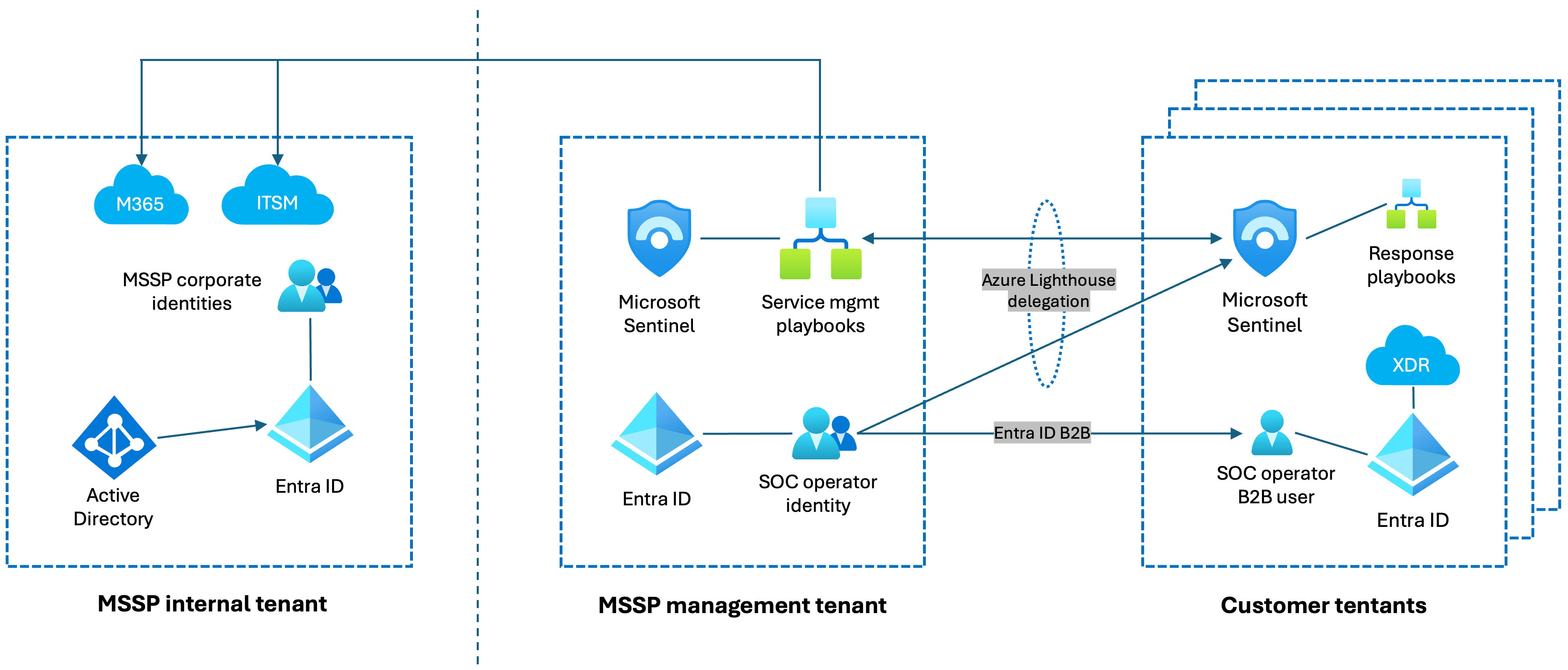
Here we see the SOC operator identity as the main entity that operates in customer Defender, Sentinel, Azure, M365 and Entra environments.
Traditionally this account had Lighthouse access for Sentinel in Azure Portal, and B2B access for Defender.
Even today with the “unified portal” consolidating Defender and Sentinel workloads and data, nothing here really goes away, but the priority of access management methods changes.
For daily human operations, Lighthouse access is no longer necessary when operating in either the normal Defender portal or the Multi-tenant management portal (MTO). Since the Sentinel UI no longer lives in the Azure portal, it does not use Azure based access methods.
Here is an example permission matrix for usual SOC roles and the different environments:

Dual Sentinel roles may be important during Sentinel in Azure portal sunset period, but after that the Sentinel related Lighthouse roles are not much needed for humans. One exception for this is the workspace() operator in KQL, which in Advanced Hunting seems to still use Lighthouse access.
For other Azure management work, the MSSP has to decide if they stick with Lighthouse or use B2B account roles.
So in short, for human operators it is all (or at least mostly) about Entra B2B from now on!
Deploying and managing B2B users
Most MSSPs I know already have some process of deploying B2B users, but the Sentinel shift to Defender portal has created a lot of new interest in how to actually manage B2B accounts in customer Entra tenants, so I want to explore the options here briefly.
If we look at Microsoft documentation, we see references to two methods:
1) Defender document references cross-tenant sync:
Set up Microsoft Defender multitenant management
2) MDE docs instruct to use Access Packages:
Grant managed security service provider (MSSP) access (preview)
There also exist other options, such as handling B2B invitations with PowerShell scripts or Microsoft Graph calls.
Below is a comparison table for the two “official” methods:

This is my wording and some of it is a bit opinionated, but generally I consider cross-tenant sync to be the more suitable method for most MSSPs.
Note that cross-tenant sync by default creates users as B2B Members, which might be good for operators (for example managing MDO threat policies is not possible for B2B Guests), but creates license requirements as B2B Members are not included in the MAU model and need actual Entra licenses.
Script based solutions may be handy for initial customer onboarding, but the problem usually is that new joiners and leavers in the SOC are often not covered by those and need to be handled manually. Of course you can also build a DIY automated solution based on Power Automation + Microsoft Graph, or some other automation toolkit.
Conditional Access
Understanding how CA policies and MFA work for B2B accounts is a critical part of this exercise.
I advocate for having Entra P2 licenses for the MSSP management tenant, as then you can have full CA policy + Identity Protection as part of securing the management environment.
We often end in a situation where CA policies and MFA requirements exist both on the MSSP and the customer side. Best practice here is to configure B2B cross-tenant settings to trust MSSP session information, so that the MSSP side claim for the operator is trusted in customer tenants, minimising the prompt amount:
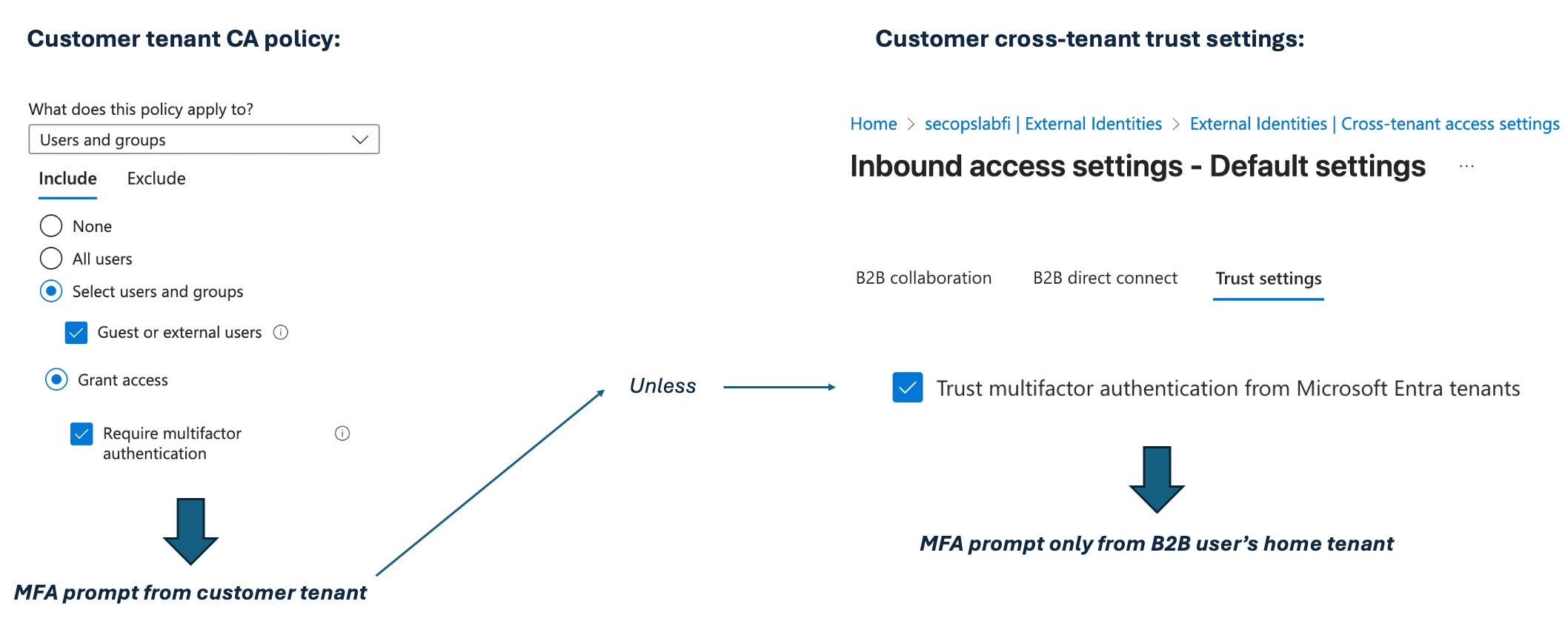
Btw, if the customer tenant has only Entra free licenses, there might be problems. Entra free does force MFA registration for everyone with Security Defaults, but prompts for MFA on every sign-in only for users with administrative roles. Regular users are prompted based on risk-based conditional evaluation and some SOC operators likely belong to this category. This does not play well with the MTO portal which expects MFA for all customer tenant connections.
Managing permissions
Getting the users deployed is only part of the way to success, you also need to manage permissions for Defender and Sentinel, and also for any response actions your operators are going to handle elsewhere in the M365/Azure/Entra ecosystem.
My high level suggestions for this are pretty straightforward:
Use Defender RBAC roles, try to avoid using traditional Entra security roles for normal operations.
SecOps toolkit administrative tasks and incident response tasks should use PIM for just-in time delegation for sensitive roles.
Everything here can and should be group based, be it normal daily operator access to the portal or the PIM permissions.
A good idea is to build dynamic groups for security portal access. As an example for that you can check the configuration in the screenshot, which identifies analysts from a specific tenant to be included in a specific group:
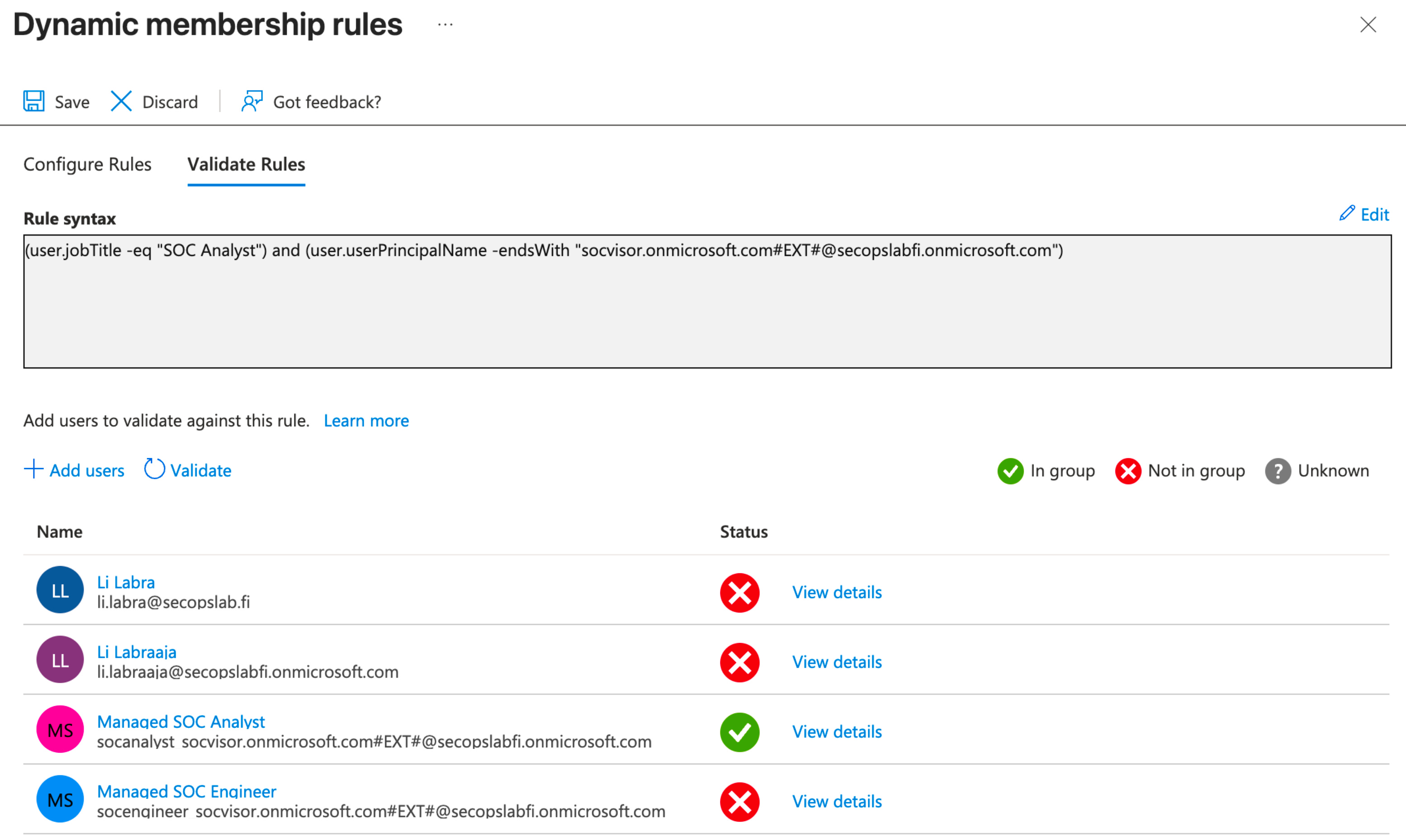
These groups can be then added as members inside RBAC policies in the security portal. For Entra roles this is not so straightforward unfortunately, as role-enabled groups do not support dynamic membership.
In case you are wondering how PIM activation can be handled in a multi-tenant environment, I have to say there is no golden ticket here. PIM always requires actual human + web browser interaction, so getting rid of that is not going to work, but launching the activation can be started with PowerShell or a Microsoft Graph call, which might help orchestrate parts of the process.
Summary
With cross-tenant sync and dynamic Entra group management in customer tenants, its simple to create a pretty nice B2B workflow:
New users get automatically deployed to customers.
User removal and disabling is automatic.
Dynamic groups can automatically grant users the required SecOps toolkit access.
Updated for mention of workspace() operator in the permissions bit.